Extra Coupon Features
A discount rules engine for WooCommerce
Most coupon plugins let you build a rule and then leave you guessing when it does not fire. This one gives you a condition engine with real AND/OR logic, a deterministic winner when several offers compete, and a trace for every decision it makes.
It is free and GPL-licensed, and it lives in the official directory: wordpress.org/plugins/milardovich-extra-coupon-features.
Why it exists
"Why is my coupon not applying?" is the question every discount plugin eventually has to answer, and most of them answer it with silence. The rule either fires or it does not, and finding out why means reading someone else's code.
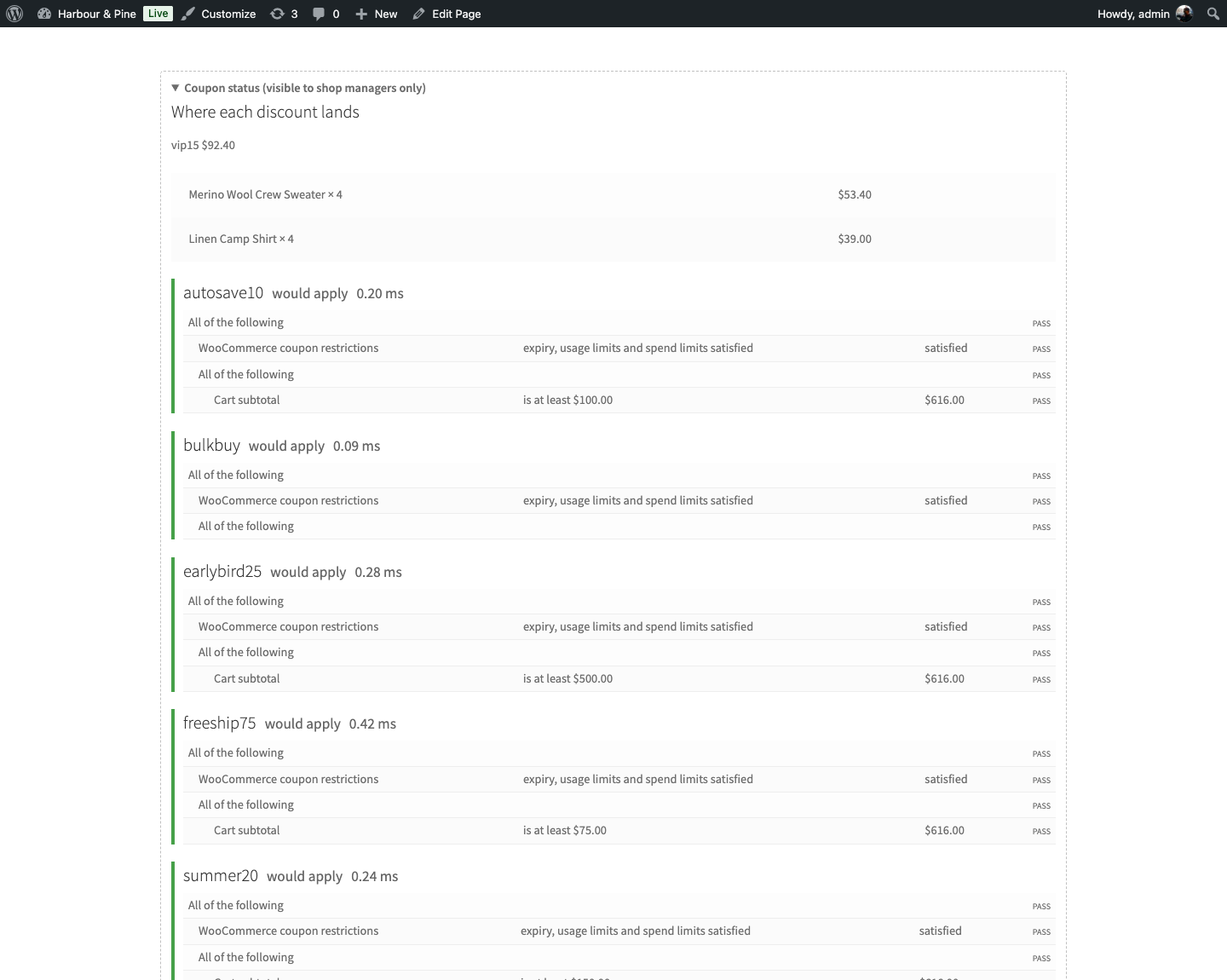
So the trace came first here, and everything else was built around it. Every condition reports what it expected, what it actually found, and whether it passed — on the coupon screen, on the cart, in the admin, over REST and from the command line. It is never paywalled, because observability is the whole reason to trust the thing.
The condition engine
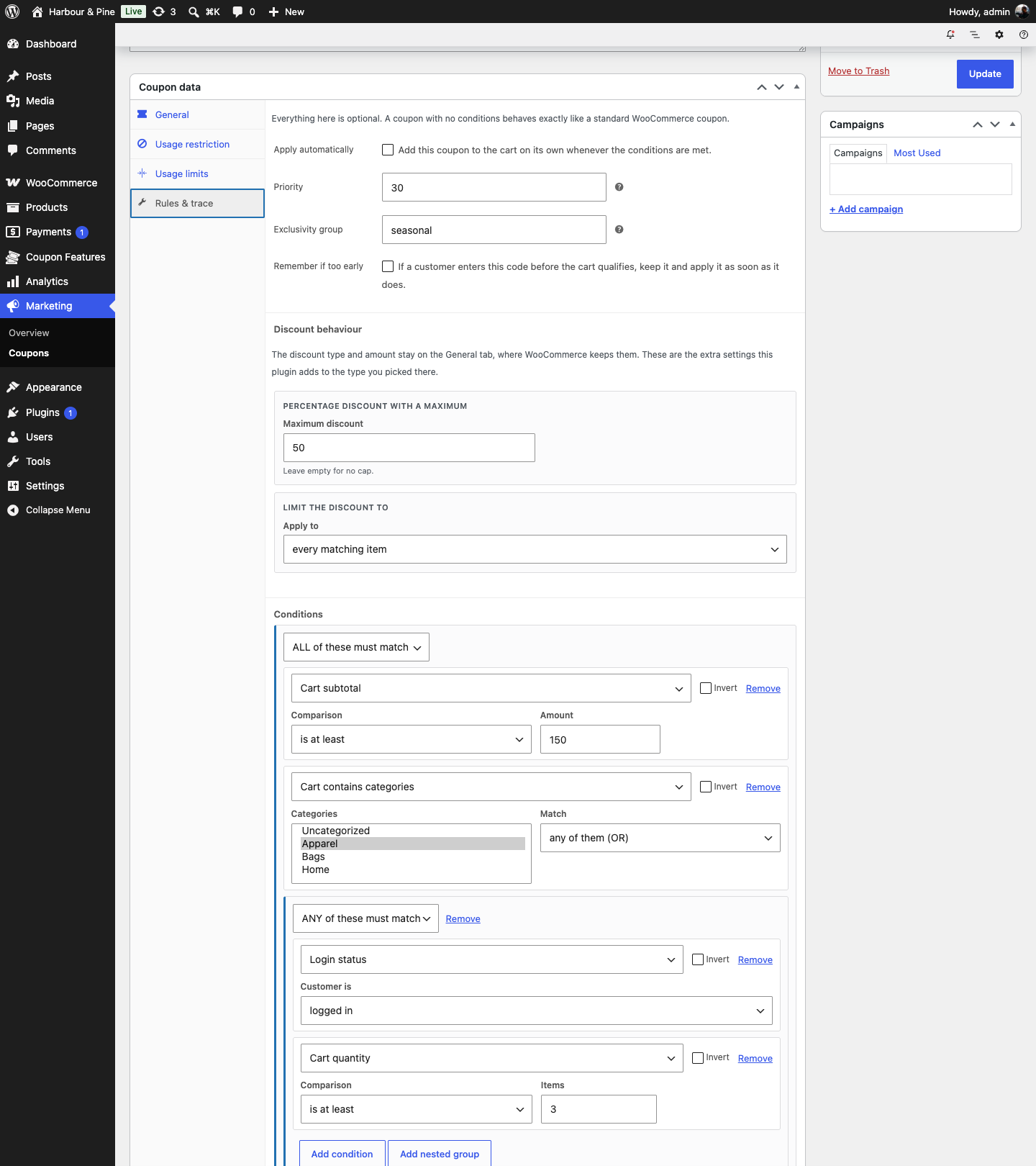
Conditions nest. A group is ALL of these or ANY of these, groups go inside groups, and any condition can be inverted. That is enough to express the offers people actually run — "apparel in the cart, and either a signed-in customer or three items" — without writing a line of PHP.
Thirty condition types ship with it, across five groups:
Cart
Subtotal, quantity, number of distinct products, weight, specific products, categories, tags, quantity of one product, subtotal within a category.
Customer
Login status, role, named customers, email pattern, hours since registration, custom user meta.
History
First purchase, previous order count, lifetime spend, hours since last order, has ordered a product or a category before.
Checkout
Shipping method, payment gateway, billing and shipping country, postcode patterns.
Time
Date range, day of the week, time of day.
Subscriptions
Renewal orders, initial orders, or regular orders — when WooCommerce Subscriptions is present.
Discount types
Eight outcomes, each expressed as a native WooCommerce discount wherever it can be, so invoices, Analytics and accounting integrations see a normal coupon rather than a mystery line item.
- Percentage and fixed discounts, on the cart or per product.
- Percentage with a maximum. "20% off, up to $50" — which is what a finance person actually signs off on.
- Buy X get Y, across specific products, sets, categories or anything in the cart. Repeating or once per order (with a maximum repeat count), reward free or discounted, and the reward quantity recomputed from the trigger every time so it can never run away with your stock. The free product can be added to the cart outright, or picked by the customer from a set you choose.
- Tiered pricing. Quantity or spend breaks: 5% from three items, 10% from five, a flat amount from ten.
- Fixed price per item. "Every shirt is $10 today."
- Free shipping, using the native flag, so the shipping methods that already honour it keep working untouched.
- Limit any discount to the cheapest items, the dearest, every nth, or the nth onwards.
Coupons that apply themselves
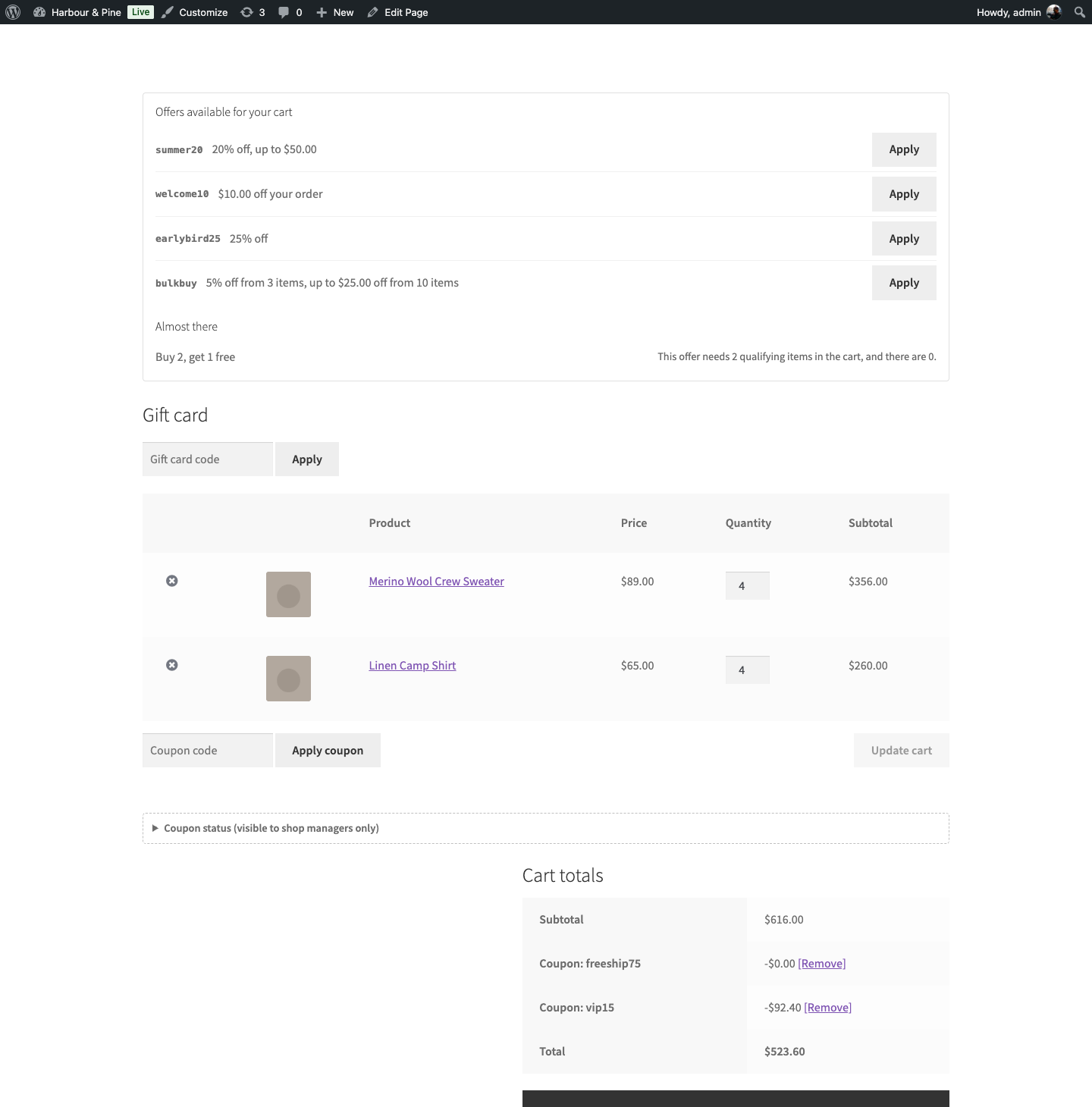
A coupon can attach itself the moment a cart qualifies. The hard part is what happens when two of them qualify at once, and that is where most plugins get vague.
Here every automatic coupon has a priority and an optional exclusivity group. Two coupons in the same group never both apply; the higher priority wins, and it is the same winner on every recalculation. No race conditions, no discount that changes when the customer refreshes.
Three behaviours follow from the same engine:
- Queueing. A customer who enters a code before the cart qualifies keeps it. The coupon applies itself the moment the cart does qualify, instead of being thrown away with an error.
- Silent removal. An automatic coupon that stops qualifying is removed quietly, without a scary message about something the customer never did.
- Respecting a decision. A coupon the customer removed by hand is not re-added behind their back.
Codes also travel in a URL — ?apply_coupon=SUMMER20, comma
separated for several, combinable with add-to-cart. The parameters
are stripped on redirect, so nothing accumulates in the address bar and nothing
is applied twice.
The coupon screen shows that link ready to copy, and a QR code for it, so the same offer works on a flyer, a shelf label or a receipt. The encoder is part of the plugin and emits SVG, so it scales for print and your store's coupon URLs are never handed to a third-party image service to render.
Three shortcodes put the same data anywhere in a theme:
[mecf_eligible_coupons]— the offers this cart can use right now.[mecf_coupon_progress]— the "spend $20 more to save 15%" nudge, computed from the real rule rather than typed into a banner by hand.[mecf_credit_form]— a customer's store credit balance and a field to spend it.
Testing a promotion before it runs
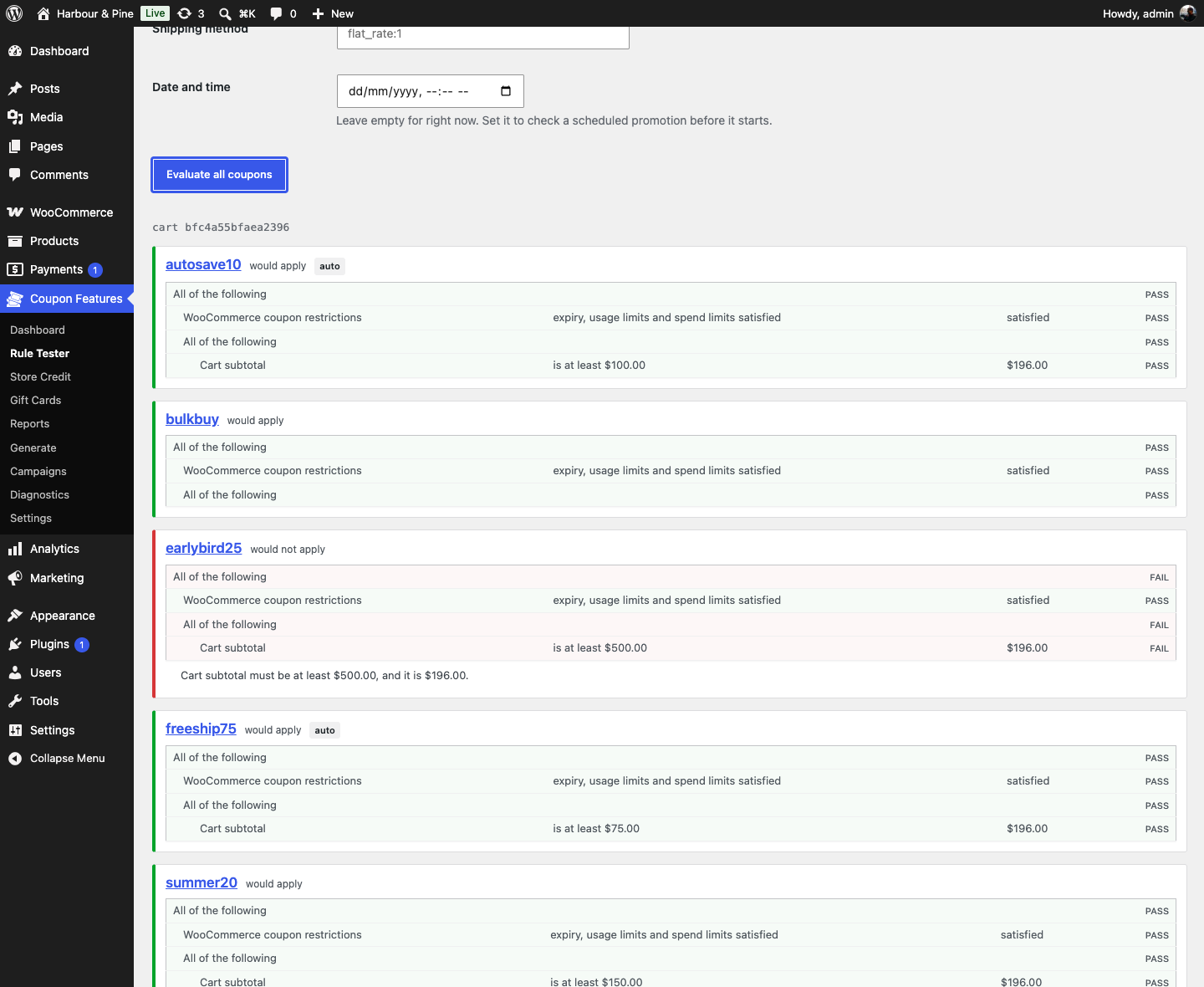
Build a synthetic cart in the admin — a subtotal, a quantity, a customer — and watch every published coupon evaluate against it. Nothing here touches a real cart, so you can find out that your Black Friday rule has an impossible condition in it on the Tuesday before, rather than at nine on the morning.
Once promotions are live, the event log records every decision — applied, auto-applied, rejected, queued, silently removed, superseded — each with its reason and the cart that produced it. The dashboard aggregates it into the one report nobody else gives you: why coupons are being rejected, ranked by how often.
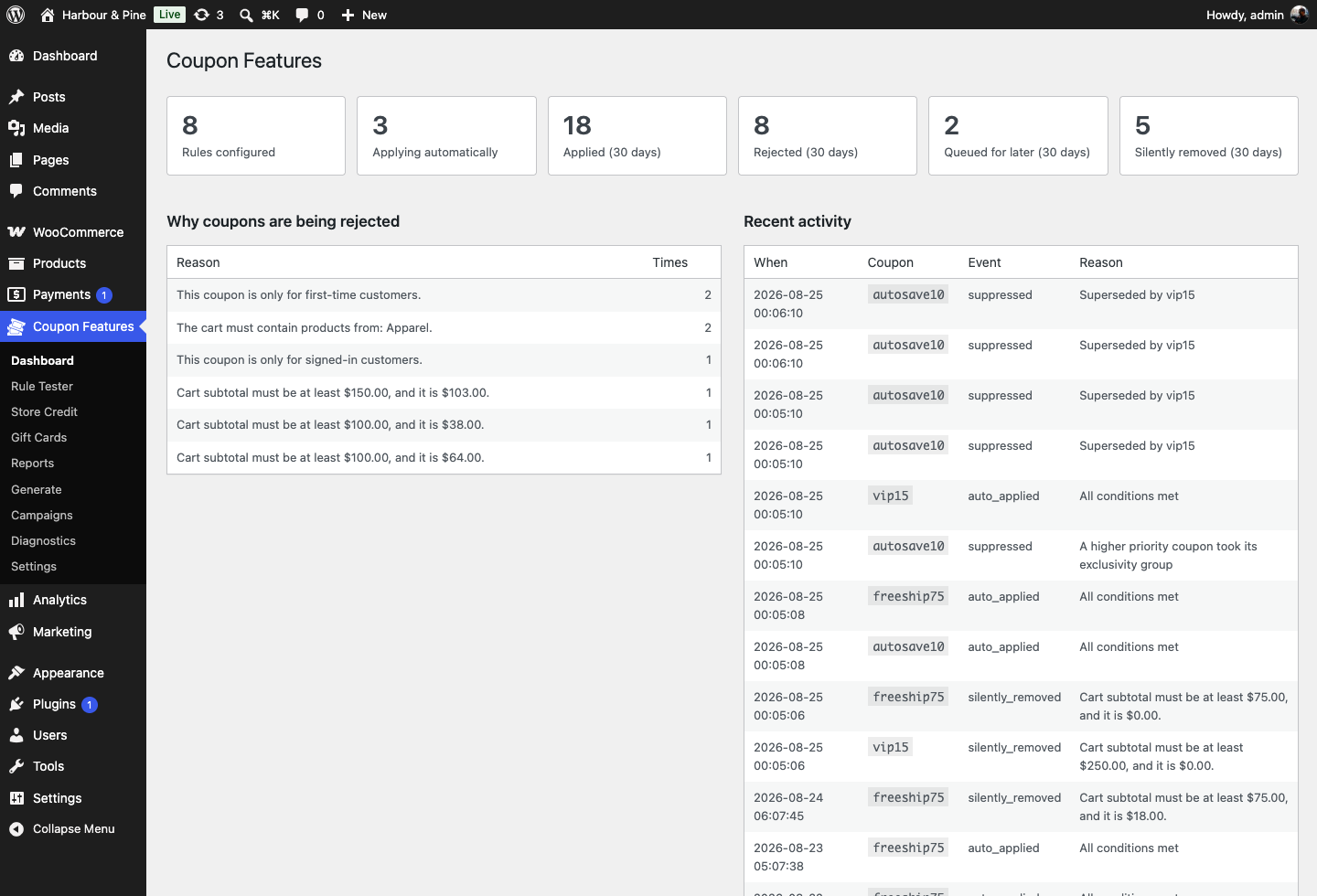
A diagnostics screen sits behind both, checking the environment and clearing the rule cache on demand. It also warns you when a page-cache plugin is active, because rules are evaluated server side on every totals calculation and cached markup is the one thing that can show a shopper an offer list that is no longer true.
In the admin
The rule builder is a tab on the coupon screen you already use, and everything else lives under a single Coupon Features menu: Dashboard, Rule Tester, Store Credit, Gift Cards, Reports, Generate, Campaigns, Diagnostics and Settings.
Fields appear as they become relevant rather than all at once, a coupon with no conditions behaves exactly like a stock WooCommerce one, and nothing in the interface is a locked feature advertising an upgrade. There is no paid tier to advertise.
Store credit and gift cards
Store credit sits on an append-only ledger. The balance is the sum of its history, never a number somebody edited — which is the only version of this an accountant will accept. Partial redemption, expiry, refund-to-credit, and adjustments that refuse to save without a note, because an unexplained adjustment is unauditable.
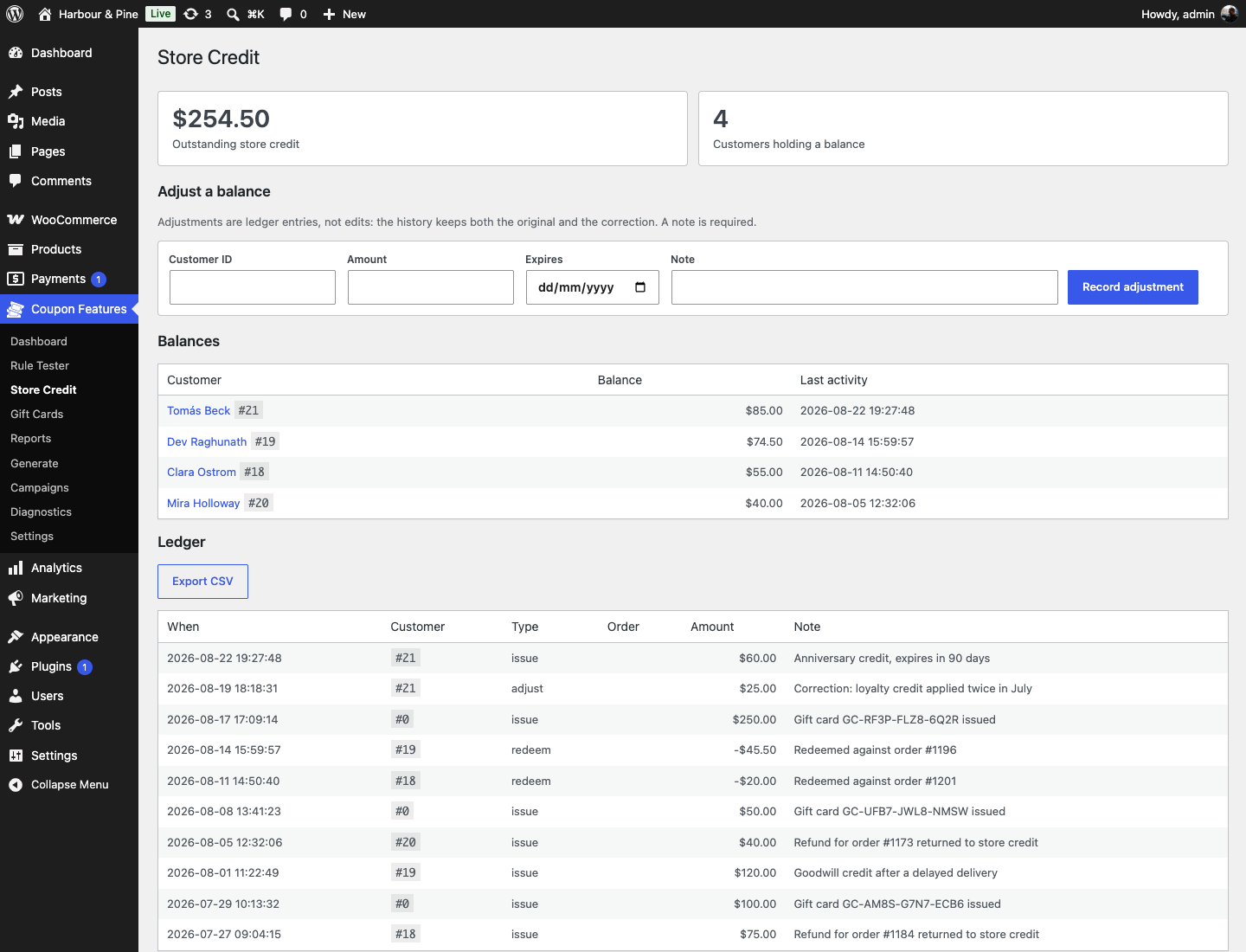
Both instruments spend as a negative fee on the cart, which WooCommerce, its reports and every tax integration already understand. The ledger is written only once an order exists and is keyed to it, so an abandoned cart spends nothing, a retried payment callback spends nothing twice, and cancelling an order returns what it spent exactly once. Tax treatment is a setting, not an assumption: credit applied before tax reduces the taxable base, after tax does not, and which one is correct depends on your jurisdiction — so you choose, rather than discovering the plugin's opinion at audit time.
Gift cards are sold as ordinary products, with fixed denominations or an amount the buyer types in, a recipient, a message and scheduled delivery. They are issued when the order is paid, never when it is placed, so a failed order never mints money; codes skip ambiguous characters so they survive being read down a phone. A card keeps its remaining balance by default; tick one use when issuing it and it is spent in a single order instead.
Both feed liability reporting: outstanding balance, aging, issuance and redemption by month, breakage, and a CSV of the whole ledger for whoever closes your books.
Campaigns, generation and reporting
- Bulk generation from a template coupon — discount, restrictions and rule and all — with prefixes, expiry and usage limits, plus CSV import and export. An import skips codes that already exist rather than overwriting them.
- Lifecycle campaigns that generate a single-use code and email it on signup, first order, an nth order, a birthday, a win-back or an abandoned cart — each firing once per event, even if the hook runs twice. The send is recorded when the code is minted, not after the mailer returns, because a broken mailer that retries would otherwise print money.
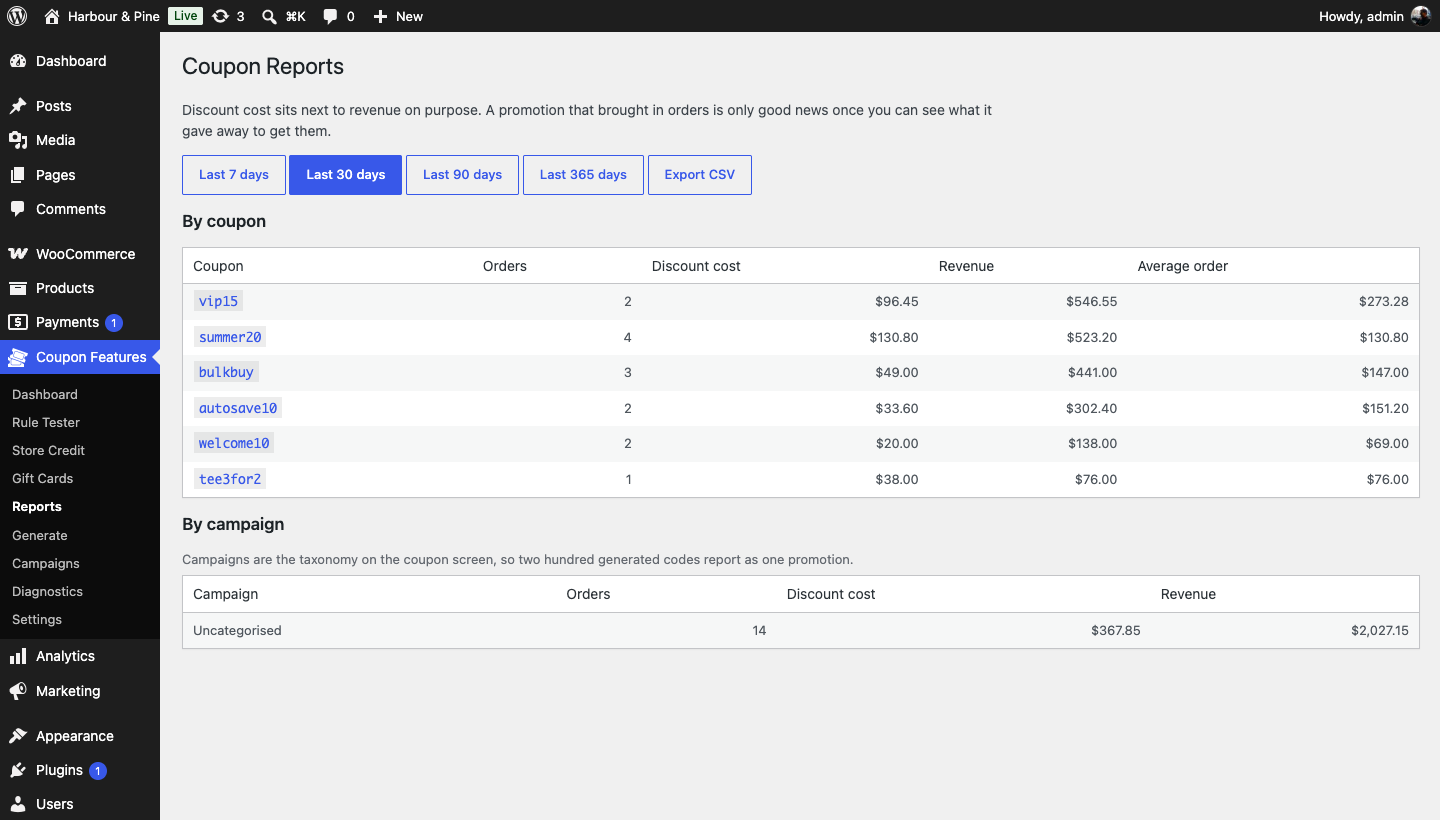
- Reporting per coupon and per campaign: redemptions, discount cost, revenue and average order value, side by side. It aggregates when an order is paid and reverses on cancellation or refund, so revenue never counts orders the store did not keep.
- Anti-abuse limits by IP, by email and inside a rolling window, plus blocked email domains — counted from paid orders, so a guest checkout with a fresh address does not walk around them.
Migrating in
Importers read Advanced Coupons and Soft79's Extended Coupon Features in their own storage formats and translate their rules into this one. Each import previews first, and tells you plainly what it could not map before you commit to anything — including the details that do not survive translation, like a sort priority that runs the other way round.
For developers
Every condition and outcome is a registered type using the same public interface the built-ins use. There is no private tier.
add_action( 'mecf_register_conditions', function ( $registry ) {
    $registry->register( 'crm_segment', [
        'label'    => __( 'CRM segment', 'my-plugin' ),
        'group'    => 'customer',
        'fields'   => [ 'segment' => [ 'type' => 'text', 'label' => 'Segment' ] ],
        'evaluate' => function ( $args, $context ) {
            $segment = my_crm_lookup( $context->get_customer_id() );
            return [
                'passed'   => $segment === $args['segment'],
                'expected' => $args['segment'],
                'actual'   => $segment,
            ];
        },
    ] );
} );
A registered condition appears in the builder, in the tester, in the trace and
over REST with no further work. Alongside it: a
mecf_trace_coupon( 'SUMMER20' ) helper that returns the full
decision, nine REST routes under mecf/v1, a WP-CLI command for
rules, credit, gift cards, generation, imports, events and diagnostics — and
eighteen hooks.
Filters
mecf_can_apply_coupon( $can, $coupon, $context )- Veto an application the engine was going to allow. Runs after the conditions have been evaluated, so the trace is already built when you see it.
mecf_resolve_conflicts( $winners, $candidates, $claimed_groups )- Override which coupon wins when several compete, after priority and exclusivity groups have picked.
mecf_eligible_offers( $offers, $context )- The offers the cart lists as usable right now.
mecf_upcoming_offers( $offers, $context )- The ones it lists as not qualifying yet, with what the cart is short of.
mecf_history_order_statuses( $statuses )- Which past orders count as purchase history. Defaults to processing, completed and on-hold.
mecf_history_order_limit( $limit )- How far back the history conditions read. Defaults to the last 100 orders.
mecf_convert_amount( $converted, $amount, $to, $provider )- The final say on currency conversion, after the detected switcher has had its turn — which is where you go when your multi-currency plugin is not one of the ones handled.
mecf_outcome_field_groups( $groups )- Add settings to the coupon screen.
mecf_birthday_meta_key( $key )- Where the store keeps birthdays, for the birthday campaign. Defaults to
mecf_birthday. mecf_giftcard_email_subject( $subject, $card )- The subject line of the gift card email, with the card being sent alongside it.
Actions
mecf_register_conditions( $registry )- The condition registry is being built. This is where your own types go in; it runs once per request, early.
mecf_register_outcomes( $registry )- The same, for discount outcomes.
mecf_credit_entry_added( $data, $entry_id )- A row was appended to the store credit ledger.
mecf_giftcard_issued( $card )- A gift card was created, with the stored row.
mecf_coupons_generated( $codes, $template_id, $batch )- A bulk generation run finished, with every code it minted and the batch they share.
mecf_campaign_fired( $campaign, $code, $recipient, $sent )- A lifecycle campaign issued a code.
$sentsays whether the email actually left, so a broken mailer is visible to you rather than silent. mecf_coupon_event( $event, $code, $data )- Every coupon decision, through one hook: applied, auto-applied, queued, removed, silently removed, rejected and suppressed.
$eventsays which one it was. mecf_coupon_{$event}( $code, $data )- The same decision as one hook per outcome —
mecf_coupon_applied,mecf_coupon_queued,mecf_coupon_removed, and so on — so a listener that cares about only one does not have to switch on the event name.
Everything after the two registries is a notification rather than a decision: they run after the write and their return value is ignored, so they are where an integration pushes into a CRM, a queue or an audit trail instead of polling for changes.
$data carries coupon_id, reason — the same
sentence the customer or shop manager was shown — customer_id,
session_id, cart_signature and trace: the
full evaluation trace when the decision came from evaluating conditions, and
null when it needed none, as with a coupon the customer removed by
hand.
Both fire before the event log's own enabled check, deliberately. An integration listening here keeps working on a store that has logging switched off — the log is a diagnostic, and hanging a CRM sync off a diagnostic setting means turning logging off quietly breaks it.
add_action( 'mecf_coupon_applied', function ( $code, $data ) {
    my_analytics_track( 'coupon_applied', [
        'code'     => $code,
        'customer' => $data['customer_id'],
    ] );
}, 10, 2 );
Compatibility
- Classic cart and Cart/Checkout Blocks. The rules hang off the totals calculation both go through, and the Store API carries the offer data for Blocks.
- HPOS compatible.
- Multi-currency aware, so an amount entered in the shop's base currency converts for a customer shopping in another.
- WooCommerce 8.0+, WordPress 6.5+, PHP 8.1+.
- GPL v2 or later. No outbound requests, no bundled third-party code, no telemetry.
- Stated plainly: multi-currency is verified against CURCY/WOOCS, and the other switchers are built from their public APIs but not yet exercised. WPML and Polylang have hook points and nothing more. The Subscriptions condition is written against that plugin's documented functions and says so honestly when it cannot find them.
Get it
The plugin is published on the WordPress.org directory, so you can install it straight from Plugins → Add New in your admin, or download the ZIP from its page. If you want to talk about it — or about WordPress and custom plugin work generally — I am easy to find.